My story with programming began in the late ’90s, with a small pocket organiser I bought second-hand from a friend.
A pocket diary that could do more
My friend loved technology and had the money to keep up with every new gadget. He was about to buy the new Psion Series 5, so he sold me his old Series 3a for a ridiculous price.
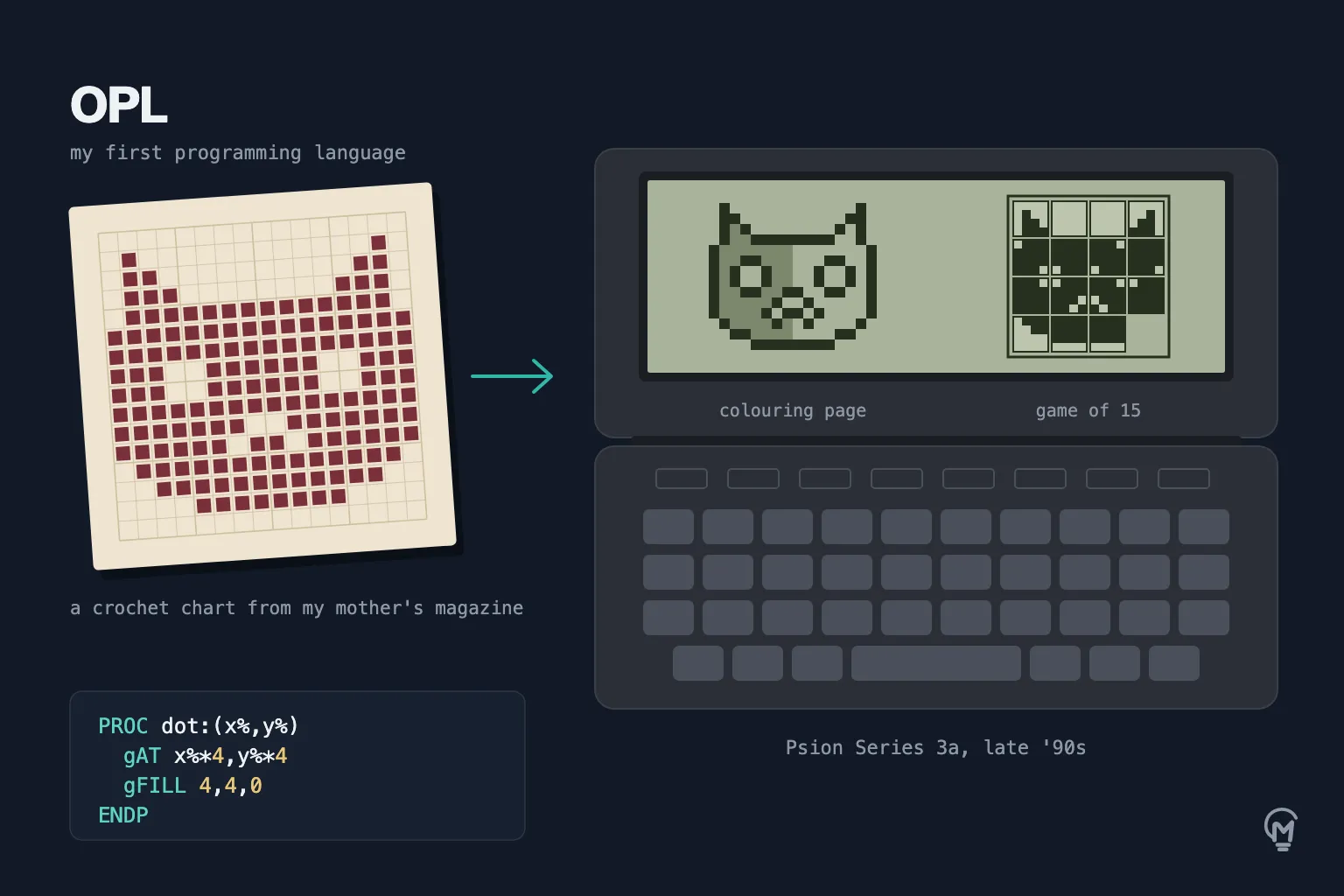
It folded shut like a small diary and opened onto a tiny keyboard and a grey screen. People bought it to keep appointments, write notes and track expenses, yet tucked inside its menu was something that caught my attention far more: OPL, a built-in way to create your own programs. You could write them and try them out right there in your hands, wherever you happened to be, without needing a computer on a desk. That little Psion is where everything started for me.
A book at a mountain newsstand
I learned how to use it from a book, and where I found that book still surprises me today. It was sitting on the shelf of a small newsstand in a village lost in the mountains of Sicily. Among newspapers and magazines, in a place where nobody would ever think of looking for one, there was a book on how to make programs on a Psion.
Thinking about it today, it seems absurd that it was there waiting for me. Back then I didn’t stop to wonder how it had ended up on that shelf: I saw it and bought it. Looking back now, it feels as if my path had already been written.
My mother’s crochet magazines
Once I knew enough to try making something of my own, I knew right away what I wanted: a colouring book. A colouring book needs drawings, and the only way to get pictures onto that little screen was to put them in by hand. What I had at home were my mother’s crochet magazines.
Her magazines were full of patterns printed as grids of tiny squares, some filled in and some left blank, meant to be followed row by row with a crochet hook until a picture took shape. Looking at those pages, I realised I already had my drawings. I sat down with a magazine open beside me and copied the charts onto the Psion one square at a time: every filled square on paper became a dot on the screen.
I only finished a handful of them. Working on those tiny keys took patience, and every single picture took a long time.
Making something for myself
Out of those few drawings came two small pastimes.
The first was the colouring book itself: you picked one of the pictures and coloured it in with the few shades of grey the 3a’s screen could show (the Series 5 that came later had more).
The second was the game of 15, the classic sliding puzzle with fifteen tiles in a four-by-four frame and one empty space. Instead of numbers, the tiles held pieces of my drawings, so solving the puzzle meant sliding them around until the picture came back together.
Nobody else ever used them. I hadn’t made them for anyone else: I wanted them for myself, they did what I had in mind, and that was enough. Without realising it at the time, that was also how I discovered what I wanted to do.
I don’t have the Psion anymore, or anything that was saved on it. Somewhere between one move and the next, it got lost. I’m still sorry about that: over the years I never gave much thought to keeping the old devices I owned, and that is the one I wish I still had.
Almost thirty years later
That first idea never went away. Years later I looked for colouring apps, and the ones I found were full of ads and ugly drawings. So I ended up building the one I wanted: Scarabokki, a gallery of colouring pages with a studio where you can create new ones of your own.
It has the 15 puzzle too.
Looking back, everything I build today comes from the same impulse I had with that Psion in my hands. Fuego, Scarabokki and MiServe DevTools all started the same way those first colouring pages did: I needed something, nobody had made it the way I wanted, so I built it myself.
Note: the date on this post is only symbolic. I wrote this story years later, to place the memory back where everything started.