Developer tools ask you to paste the worst things into a web page: a JWT from production, a password to hash, a config file. With most online tools you cannot tell whether that text stays in your tab or travels to a server.
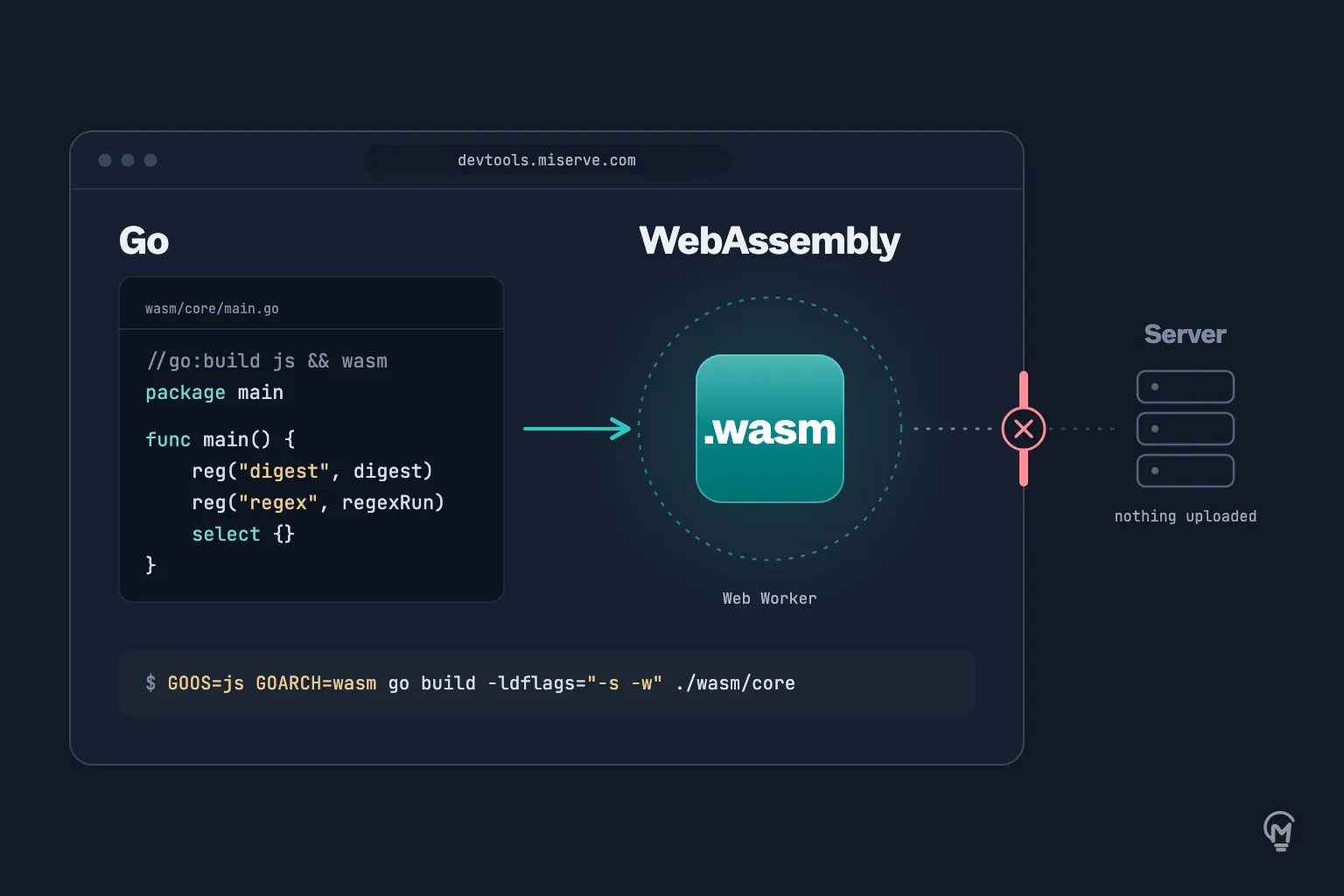
I wanted MiServe DevTools to be the kind where it stays. It has 39 tools, no accounts, and what you paste is not uploaded. To get there I compiled Go to WebAssembly and ran it in the browser. This is what I learned.
Start with the browser, not with WebAssembly
Twenty-nine of the 39 tools never load a line of my Go. Base64, JSON formatting, UUIDs, time zones, color conversion: the browser already does these through Web Crypto, Intl, Canvas and TextEncoder, and TypeScript on top of them is enough.
Go comes in where the platform stops:
- Hashing. Web Crypto offers SHA-1 and the SHA-2 family. MD5, SHA-3, BLAKE2, CRC-32 and bcrypt come from Go.
- Regular expressions. JavaScript’s engine is not RE2. If the pattern is going into a Go program, I want to test it against Go’s own
regexp.
- Time layouts.
2006-01-02 15:04:05 only means something to Go’s time package.
- jq. The playground runs gojq, a complete jq written in Go.
- Markdown. goldmark renders it, and the preview is sanitized before it is shown.
- Favicons and QR codes. Go’s image packages do the resampling and write the ICO file.
- Magic Wormhole. wormhole-william speaks the same protocol as the
wormhole command line.
None of this was rewritten for the browser. These are the packages I would have put behind an API. They run in the tab instead.
The price is megabytes
A Go module carries the Go runtime and its garbage collector, so even a small one is not small. These are my four modules, built with the standard toolchain:
GOOS=js GOARCH=wasm go build -trimpath -ldflags="-s -w" -o public/wasm/core.wasm ./wasm/core
core (hashes, bcrypt, regex, time layouts): 5.2 MB, 1.0 MB with Brotliimage (favicons, QR codes): 5.9 MB, 1.2 MB with Brotlidata (jq, Markdown): 9.6 MB, 1.7 MB with Brotliwormhole: 7.8 MB, 1.6 MB with Brotli
Sizes are MiB, rounded to one decimal: core.wasm is 5,455,868 bytes, which I write as 5.2 MB. Built with Go 1.26.0, gojq v0.12.20, goldmark v1.8.7 and wormhole-william v1.0.8; Brotli is quality 11, run once at build time.
A megabyte or more for one tool is a lot next to a page of static HTML. I did not make the modules smaller. I made sure almost nobody pays for one they do not use.
Four modules, not one. A visitor who wants an MD5 should not have to download jq. The split follows what tools need together.
Nothing loads until a tool asks. The worker and the module are created on the first call. An ordinary visit never fetches a module for a tool it does not open; only an installed copy takes the rest ahead of time, which is the last point below. When I can guess the call is coming, for example when the hash tool’s text field gets focus, the download starts early.
Compress once, cache for a year. The build writes a Brotli and a gzip copy of every file, and the server picks one. It never compresses at request time. Each module is requested as core.wasm?v=<digest>, so it can be cached as immutable, and a new build changes the digest. The server sends application/wasm, which lets the browser compile the module while it is still downloading.
Offline, with limits. The site is installable and works offline. The service worker keeps a module the first time a tool needs it. It only downloads modules ahead of use for an installed copy, and never when the browser asks to save data.
Keep Go off the main thread
A bcrypt hash at a high cost, or a regular expression over a large text, takes long enough to freeze a page. So every module runs in a Web Worker, and a tool sees one function:
type Sums = Record<string, string>;
const sums = await wasm<Sums>('core', 'digest', ['sha256'], bytes);
On the Go side, a module is a main that puts its functions on a global object and then never returns. This is the core module, trimmed:
func main() {
	api := js.Global().Get("Object").New()
	reg := func(name string, fn func(args []js.Value) any) {
		api.Set(name, js.FuncOf(func(_ js.Value, args []js.Value) (out any) {
			defer func() {
				if r := recover(); r != nil {
					out = errObj(fmt.Sprint(r))
				}
			}()
			return fn(args)
		}))
	}

	reg("digest", digest)
	reg("bcryptHash", bcryptHash)
	reg("regex", regexRun)

	js.Global().Set("dtcore", api)
	js.Global().Get("__dtReady").Invoke("core")
	select {}
}
Three details in there matter:
select {} keeps the program alive. When main returns, the Go runtime exits and every exported function stops working.- The
recover turns a panic into an error the page can show. Without it, one bad input kills the module for every call after it.
- Instantiating the module is not enough: the functions exist only once
main has run. So Go tells the worker when it is ready, and the worker answers calls only after that.
Two more things belong in the bridge. A large file is not copied into WebAssembly memory whole: the hash tool sends it in 8 MB chunks and Go keeps the running state. And a download that fails is not retried on every keystroke. The worker waits 1 second, then 2, 4, 8, up to 15, and tells the page that the module did not load, which is a different message from “your input is wrong”.
Timers do not interrupt Go here
The jq playground runs a program the visitor wrote, and that program may never finish. On a server I would use context.WithTimeout and move on.
In the browser that context never expires. Go compiled to WebAssembly has one thread and no preemption, so while a filter is spinning, the timer behind the context does not get a chance to fire.
gojq asks the context whether it is done on every step, so that is where I look at the clock myself. The first version read the clock on every step. Reading it is a call from WebAssembly out to JavaScript, far slower than the step it guards, and a filter that produced ten thousand values took seconds. Now it reads the clock once every 1024 steps:
func (d *deadline) Done() <-chan struct{} {
	if !d.closed {
		if d.steps++; d.steps%deadlineEvery == 0 && time.Now().After(d.at) {
			d.closed = true
			close(d.ch)
		}
	}
	return d.ch
}
If even that fails, the page has a last resort: it terminates the worker and starts a fresh one on the next call.
Let the browser enforce the promise
“Nothing is uploaded” is easy to write and hard for a visitor to check. So the server sends a Content-Security-Policy that does most of the enforcing:
connect-src 'self' https://analytics.miserve.com
A tool page can talk to its own origin and to my self-hosted analytics, which counts page views. That is the policy for 37 of the 39 pages. If a dependency tried to send your token anywhere else, the browser would refuse the request. WebAssembly needs one addition to the policy, 'wasm-unsafe-eval' in script-src, or the module will not compile.
The two pages that widen connect-src each open it for one host. The image editor downloads its background-removal models from Hugging Face, 4.6 MB to 219 MB depending on the quality the visitor picks: that is a download, not an upload, the picture stays in the tab, and the page says so before the download begins. Magic Wormhole needs its host because sending text to another machine is the whole job. The text is encrypted in the tab, then carried by the public mailbox server that the wormhole command line uses. That needs a WebSocket to another host, and a worker follows the policy of the script it was loaded from. So the wormhole module has a worker file of its own: that file and the tool’s page are the only responses allowed to reach the mailbox host. The other modules stay in a worker that can connect nowhere else.
Where the promise is thinner than it sounds
- The policy closes the network, not the browser.
connect-src covers fetch, XHR and a WebSocket; img-src and form-action close the image request and the form post. A page can still navigate away with the text in the URL. That is why the policy is one of two locks; the other is that I write the code and read what I depend on.
- A stopped filter loses its work. The cooperative deadline returns what the filter produced before it expired. Terminating the worker, the last resort above, does not: the visitor gets an error and an empty output.
- Offline is partial. The service worker saves the pages of the language you are reading, and keeps a module once a tool has fetched it. It only takes all of them ahead of time after the site is installed. A tool never opened on a device does not work offline on it.
Was it worth it?
For these tools, yes. I got Go’s regexp, time, crypto and image packages, plus gojq and goldmark, without writing or trusting a JavaScript port of each, and without running a server that sees what people paste. The cost is a megabyte or two on the wire, on the first use of ten tools out of 39, and a bridge of about 170 lines of TypeScript.
The tools are at devtools.miserve.com. Each page says where its work happens: in the browser, in WebAssembly, or, for the two that need the network, on a server of mine or through the wormhole mailbox.